
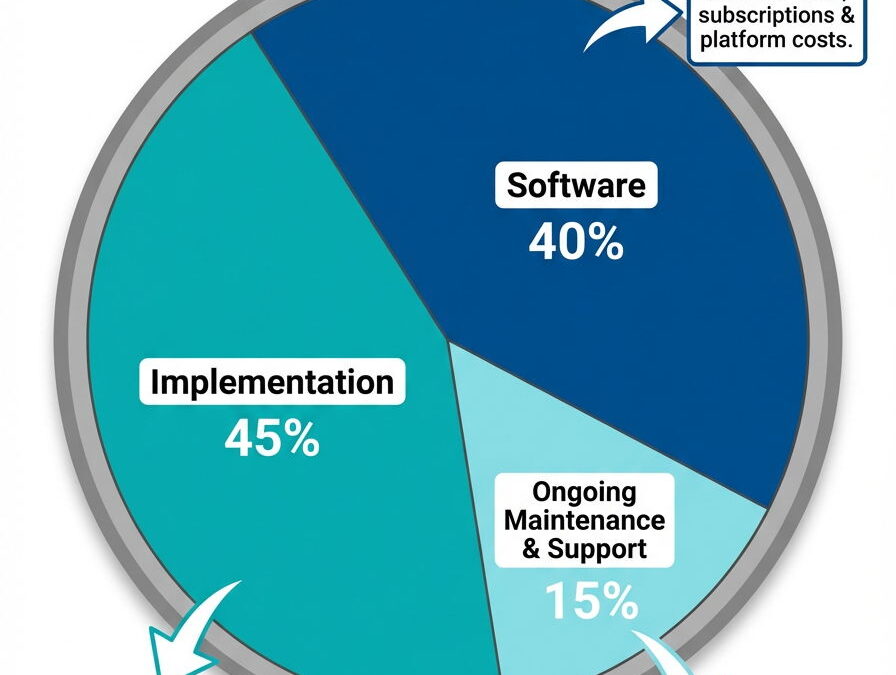
"How much is this going to cost?"
It's the first question everyone asks about ERP implementation. And honestly? It's the question most consultants dodge.
I'm not going to give you a price list. I can't. ERP implementation cost depends entirely on your business. But I can tell you exactly how to think about it so you're not blindsided.
The Rule of Thumb
When estimating ERP implementation costs for Spire Systems, expect to budget 1 to 1.5 times your software cost for implementation services.
So if your software investment is $15,000, plan for $15,000 to $22,500 in implementation. If it's $25,000, budget $25,000 to $37,500.
That's a range, not a guarantee. Here's what moves the needle.
The Factors That Drive ERP Implementation Cost
Data conversion complexity. This is the big one. I've had conversions take 2 hours. I've had others take 3 days. The difference? How clean the data is, how much history you're bringing over, and whether there's an existing conversion path from your old system.
Here's my advice: don't pay movers to haul your trash from the old house to the new one. Clean up your data before migration. Purge inactive customers, obsolete inventory, ancient open orders. You'll pay less, and you'll start fresh instead of importing 10 years of mess.
Form customization. Nobody wants their invoices to scream "I use the same software as everyone else." But there's a spectrum here. Must-haves like adding fields or removing ones you don't need are reasonable. Spending hours matching the exact shading of your old invoices from 2008? Probably not worth it.
Training approach. Some clients want me to train their team on every module. Others prefer to explore the software, watch Spire's YouTube videos, and call me when they get stuck. Both work. One costs more upfront, the other costs more over time. Your call.
Number of users. A single-user system costs less than a 15-user system. Pretty straightforward.
Hosting choice. You can install Spire on your own network or host it in Spire's cloud. Cloud hosting means monthly fees but no server maintenance. On-premise means more control but you're managing the infrastructure. Different cost structures, same software.
The Ongoing Costs People Forget
Software isn't a one-time purchase. Plan for:
Software Assurance. This is your annual maintenance. It keeps you current on updates and new features. Industry standard, calculated as a percentage of current software pricing. So as Spire's prices increase over time, your annual SA will too. It's based on what your modules and user count would cost today, not what you originally paid. Spire's SA is 20% of MSRP, which is the norm for the industry.
Tech support. Spire offers direct email support for an annual fee. Some clients love having that safety net. Others prefer to call me. Either way, budget something for when things go sideways.
How Long Does This Take?
Typical Spire implementations run 4 to 12 weeks from kickoff to go-live. The range depends on the same factors that drive cost: data complexity, how much customization you need, and how quickly your team can engage in training.
I'll write more about timeline and what makes go-lives smooth (or rocky) in a future post.
The Cost Nobody Budgets For
Here's what never shows up in a consultant's quote: your team's time.
Your staff still has to do their regular jobs while learning a new system. That's training sessions, testing in the sandbox, building new habits, asking questions, making mistakes, and fixing them.
Some companies carve out dedicated time for implementation. Others expect their team to squeeze it in between everything else. The second group always has a rougher go-live.
You don't pay me for that time. But it's real, and it costs you something - either in overtime, in slower implementation, or in a team that's not ready when the switch flips.
Budget for it. Even if it's just blocking calendars and setting expectations.
A Note for Companies on Bigger Systems
Not everyone reading this is outgrowing QuickBooks. Some of you are on NetSuite, SAP Business One, or another enterprise system and wondering if you're paying for more than you need.
If your annual maintenance and support fees feel out of proportion to what you're actually using, you're not alone. I work with companies who were sold a system built for a much larger operation. They're paying enterprise prices for features they've never touched.
Right-sizing to Spire won't make sense for everyone. But if you're spending $30,000 or more a year on maintenance for software that's overkill for your operation, it's worth a conversation. Sometimes the best move isn't upgrading. It's simplifying.
So What's the Real Number?
I can't tell you. Not because I'm hiding anything, but because I genuinely don't know until I understand:
- What system are you coming from?
- How clean is your data?
- How many users need access?
- What modules do you actually need?
- How much hand-holding does your team want?
Two companies with the same revenue can have wildly different implementation costs based on these factors.
The Bottom Line
Whether you're outgrowing QuickBooks or overpaying for an enterprise system you never fully needed, here's how to think about budgeting:
For new implementations: Take your expected software cost. Multiply by 2 to 2.5 for your year-one total (software + implementation). Add 20-25% of software cost annually for ongoing maintenance and support.
For right-sizing: Compare what you're paying now in annual maintenance and support against what a simpler system would cost to implement and maintain. Sometimes the migration pays for itself in two years.
That's not a quote for ERP implementation cost. That's a framework for planning.
When you're ready to talk specifics, I'll ask a lot of questions. The answers determine whether this is a $15,000 project or a $40,000 one.
And you deserve to know that before we start.
~Audrey Quick, Founder of AGS Enterprises Consulting LLC
Audrey has spent 35+ years helping businesses manage ERP implementations and accounting software transitions. If you're evaluating your options, we can book a free 15-minute call